
The strollur package stores data associated with your
Amplicon Sequence analysis. This tutorial will familiarize you some of
with the functions available in the strollur package. If
you haven’t reviewed the “Getting Started” tutorial, we recommend you
start there.
Creating a new dataset
First let’s create an empty data set named my_data.
data <- strollur::new_dataset(dataset_name = "my_data")Importing Data
The strollur package includes two functions to allow you to add sequence data.
strollur::add() - The add function allows you to add
sequences, reports, metadata, and resource references to your data
set.
strollur::assign() - The assign function allows assign
sequence abundances, sequence classifications, bins, bin representative
sequences, bin classifications, samples and treatments to your data
set.
strollur::add
The strollur::add() function allows you to add
sequences, reports, metadata, trees and resource references to your data
set.
Adding FASTA sequences
First, let’s add some FASTA data.
strollur has a function for reading FASTA files named
strollur::read_fasta(). We will use it to read the sequence
data into a data.frame.
fasta_data <- strollur::read_fasta(strollur_example("final.fasta.gz"))
str(fasta_data)
#> 'data.frame':    2425 obs. of  2 variables:
#>  $ sequence_name: chr  "M00967_43_000000000-A3JHG_1_2101_16474_12783" "M00967_43_000000000-A3JHG_1_1113_12711_3318" "M00967_43_000000000-A3JHG_1_2108_14707_9807" "M00967_43_000000000-A3JHG_1_1110_4126_16552" ...
#>  $ sequence     : chr  "TAC--GG-AG-GAT--GCG-A-G-C-G-T-T--AT-C-CGTGAT--TT-A-T-T--GG-GT--TT-A-AA-GG-GT-GC-G-TA-GGC-G-G-A-CA-G-T-T-AA-G-T-"| __truncated__ "TAC--GT-AG-GGG--GCA-A-G-C-G-T-T--AT-C-CGG-AT--TT-A-C-T--GG-GT--GT-A-AA-GG-GA-GC-G-TA-GGC-G-G-C-CA-T-G-C-AA-G-T-"| __truncated__ "TAC--GG-AG-GAT--GCG-A-G-C-G-T-T--AT-C-CGG-AT--TT-A-C-T--GG-GT--GT-A-AA-GG-GA-GC-G-TA-GAC-G-G-C-GG-C-G-C-AA-G-T-"| __truncated__ "TAC--GG-AG-GAT--TCA-A-G-C-G-T-T--AT-C-CGG-AT--TT-A-T-T--GG-GT--TT-A-AA-GG-GT-GC-G-TA-GGC-G-G-G-CT-G-T-T-AA-G-T-"| __truncated__ ...

strollur::add(
  data,
  table = fasta_data,
  type = "sequence"
)
#> Added 2425 sequences.
data
#> my_data:
#>
#>             starts ends nbases ambigs polymers numns numseqs
#> Minimum:         1  375    249      0        3     0    1.00
#> 2.5%-tile:       1  375    252      0        4     0   61.60
#> 25%-tile:        1  375    252      0        4     0  607.00
#> Median:          1  375    253      0        4     0 1213.00
#> 75%-tile:        1  375    253      0        5     0 1819.00
#> 97.5%-tile:      1  375    254      0        6     0 2364.40
#> Maximum:         1  375    256      0        6     0 2425.00
#> Mean:            1  375    252      0        4     0 1213.00
#>
#> Number of unique seqs: 2425
#> Total number of seqs: 2425
If you want to include a resource reference about your fasta data you
can use the strollur::new_reference function and the
reference parameter. strollur does not allow you to add sequences with
the same name, so let’s use the strollur::clear() function
to remove all data from our data set.
strollur::clear(data)
#>
#> Total number of seqs: 0

documentation_url <- "https://mothur.org/wiki/silva_reference_files/"
method_url <- "https://mothur.org/blog/2024/SILVA-v138_2-reference-files/"

silva_resource <- strollur::new_reference(
  vendor = "SILVA",
  name = "silva.bacteria.fasta",
  version = "1.38.1",
  usage = "alignment of sequences",
  note = "reference trimmed to V4 region",
  documentation_url = documentation_url,
  method_url = method_url
)

strollur::add(
  data,
  table = fasta_data,
  type = "sequence",
  reference = silva_resource
)
#> Added 2425 sequences.
#> Added 1 resource references.
data
#>             starts ends nbases ambigs polymers numns numseqs
#> Minimum:         1  375    249      0        3     0    1.00
#> 2.5%-tile:       1  375    252      0        4     0   61.60
#> 25%-tile:        1  375    252      0        4     0  607.00
#> Median:          1  375    253      0        4     0 1213.00
#> 75%-tile:        1  375    253      0        5     0 1819.00
#> 97.5%-tile:      1  375    254      0        6     0 2364.40
#> Maximum:         1  375    256      0        6     0 2425.00
#> Mean:            1  375    252      0        4     0 1213.00
#>
#> Number of unique seqs: 2425
#> Total number of seqs: 2425
#>
#> Total number of resource references: 1
Adding Custom Reports
You may want to add custom reports to your data set such as an
contigs assembly report, chimera report or alignment report. You can do
so by setting type = report. You must also provide a
report_type.
This is also a good time to explain what the table_names parameter does for you. strollur expects the columns in custom reports to have specific names. If your table’s names differ from what strollur is expecting, you will see an error like that below.
contigs_report <- readRDS(strollur_example("miseq_contigs_report.rds"))

strollur::add(
  data,
  table = contigs_report,
  type = "report",
  report_type = "contigs_report"
)

# Error: The report must include a column containing sequence names.
# sequence_name is not a named column in your report.

# Called from: strollur::xdev_add_report(data, table = table, type = report_type,
#    sequence_name = table_names[["sequence_name"]], verbose)
You can use the table_names parameter to tell strollur what the specific column is called in your custom report table. In the contigs_report the sequence_name column is called Name, so we will add one more line to the add function.
contigs_report <- readRDS(strollur_example("miseq_contigs_report.rds"))
str(contigs_report)
#> spc_tbl_ [2,425 × 8] (S3: spec_tbl_df/tbl_df/tbl/data.frame)
#>  $ Name           : chr [1:2425] "M00967_43_000000000-A3JHG_1_1101_18044_1900" "M00967_43_000000000-A3JHG_1_1101_15533_5293" "M00967_43_000000000-A3JHG_1_1101_18278_3345" "M00967_43_000000000-A3JHG_1_1101_22681_5598" ...
#>  $ Length         : num [1:2425] 253 253 253 253 253 252 253 253 253 253 ...
#>  $ Overlap_Length : num [1:2425] 249 249 249 250 249 249 249 249 249 249 ...
#>  $ Overlap_Start  : num [1:2425] 2 2 2 2 2 2 2 2 2 2 ...
#>  $ Overlap_End    : num [1:2425] 251 251 251 252 251 251 251 251 251 251 ...
#>  $ MisMatches     : num [1:2425] 5 0 1 1 0 14 0 0 3 0 ...
#>  $ Num_Ns         : num [1:2425] 0 0 0 0 0 0 0 0 0 0 ...
#>  $ Expected_Errors: num [1:2425] 0.07459 0.00215 0.00484 0.00379 0.0022 ...
#>  - attr(*, "spec")=
#>   .. cols(
#>   ..   Name = col_character(),
#>   ..   Length = col_double(),
#>   ..   Overlap_Length = col_double(),
#>   ..   Overlap_Start = col_double(),
#>   ..   Overlap_End = col_double(),
#>   ..   MisMatches = col_double(),
#>   ..   Num_Ns = col_double(),
#>   ..   Expected_Errors = col_double()
#>   .. )
#>  - attr(*, "problems")=<pointer: (nil)>

strollur::add(
  data,
  table = contigs_report,
  type = "report",
  report_type = "contigs_report",
  table_names = list(sequence_name = "Name")
)
#> Added a contigs_report report.
data
#>             starts ends nbases ambigs polymers numns numseqs
#> Minimum:         1  375    249      0        3     0    1.00
#> 2.5%-tile:       1  375    252      0        4     0   61.60
#> 25%-tile:        1  375    252      0        4     0  607.00
#> Median:          1  375    253      0        4     0 1213.00
#> 75%-tile:        1  375    253      0        5     0 1819.00
#> 97.5%-tile:      1  375    254      0        6     0 2364.40
#> Maximum:         1  375    256      0        6     0 2425.00
#> Mean:            1  375    252      0        4     0 1213.00
#>
#> Number of unique seqs: 2425
#> Total number of seqs: 2425
#>
#> Total number of resource references: 1
#> Total number of custom reports: 1
Note, when a report is tied to sequence names the report will be filtered to remove any sequences removed from the dataset.
Adding Metadata
Now that we have added our custom contigs assembly report, let’s
learn how to add reports not tied to sequence names. We can add metadata
to our data set by setting the type = report and
report_type = metadata.
metadata <- readRDS(strollur_example("miseq_metadata.rds"))
str(metadata)
#> spc_tbl_ [19 × 2] (S3: spec_tbl_df/tbl_df/tbl/data.frame)
#>  $ sample        : chr [1:19] "F3D0" "F3D1" "F3D141" "F3D142" ...
#>  $ days_post_wean: num [1:19] 0 1 141 142 143 144 145 146 147 148 ...
#>  - attr(*, "spec")=
#>   .. cols(
#>   ..   sample = col_character(),
#>   ..   days_post_wean = col_double()
#>   .. )
#>  - attr(*, "problems")=<pointer: (nil)>

strollur::add(
  data,
  table = metadata,
  type = "report",
  report_type = "metadata"
)
#> Added a metadata report.
Adding Resource References
We can add additional resource references to our data set by setting
the type = resource_reference.
reference <- readr::read_csv(strollur_example("references.csv"),
  col_names = TRUE, show_col_types = FALSE
)

strollur::add(
  data,
  table = reference,
  type = "resource_reference"
)
#>
#> The dataset already contains a resource_reference named 'silva.bacteria.fasta', overwriting existing reference.
#>
#> Added 1 resource references.
Adding Trees
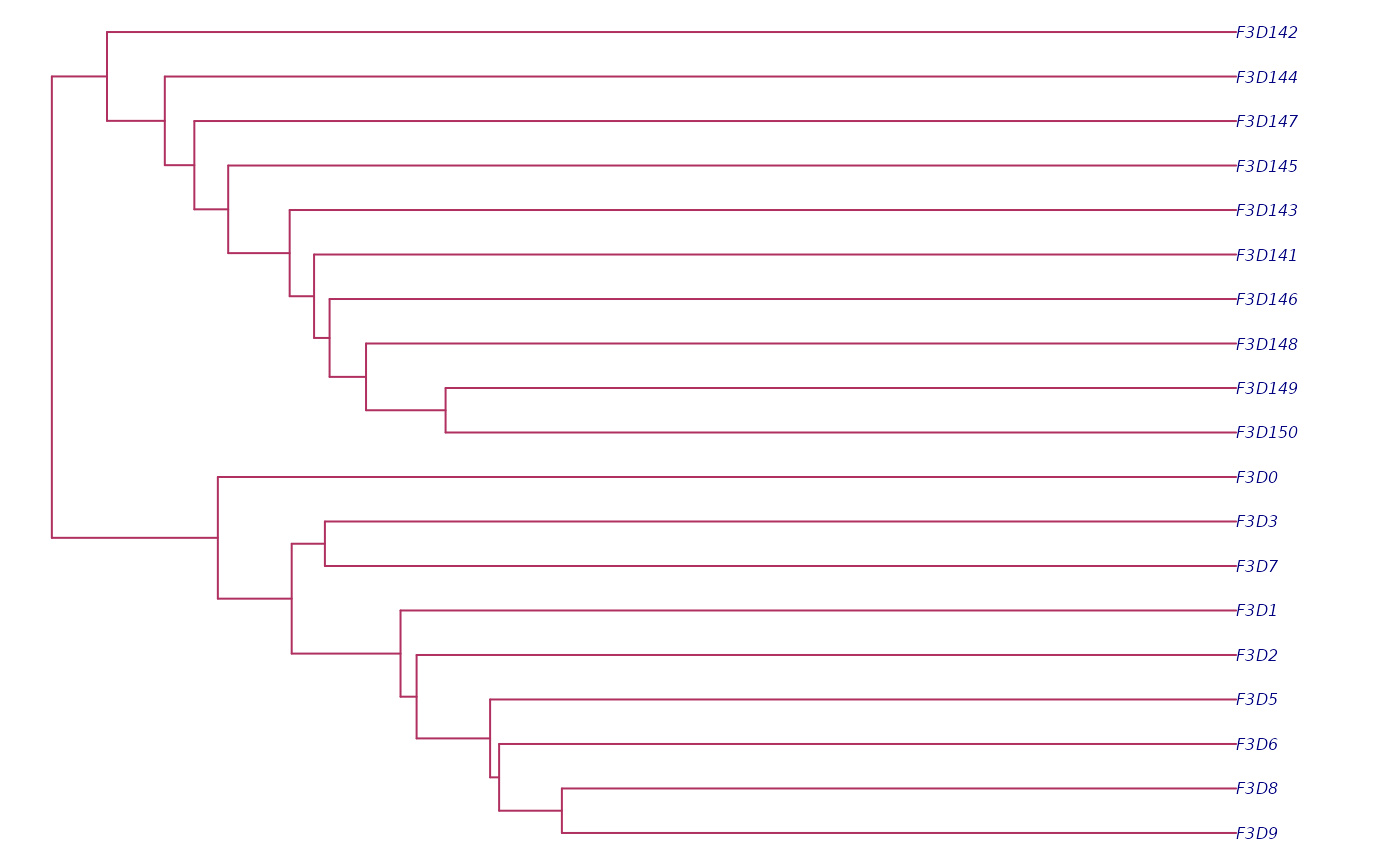
Lastly, strollur allows you to add trees that relate your samples or sequences. Let’s look at some examples together.
sample_tree <- ape::read.tree(strollur_example("final.opti_mcc.jclass.ave.tre"))
sequence_tree <- ape::read.tree(strollur_example("final.phylip.tre.gz"))

strollur::add(data, table = sample_tree, type = "sample_tree")
#> → Your dataset does not contain sample data, ignoring sample tree.
strollur::add(data, table = sequence_tree, type = "sequence_tree")

#| fig.alt: >
#|   Plot of Miseq_SOP's sample relationship tree
old_par <- par(bg = "white")
ape::plot.phylo(sample_tree,
  no.margin = TRUE,
  cex = 0.5, edge.color = "maroon", tip.color = "navy"
)
par(old_par)strollur::assign
The strollur::assign() function allows assign sequence
abundances, sequence classifications, bins, bin representative
sequences, bin classifications, samples and treatments to your data
set.
Assigning Abundances
After adding your FASTA sequences, you can assign abundance and
sample data using the assign function with the
type = sequence_abundance.
abundance_table <- readRDS(strollur_example("miseq_abundance_by_sample.rds"))
str(abundance_table)
#> spc_tbl_ [5,539 × 4] (S3: spec_tbl_df/tbl_df/tbl/data.frame)
#>  $ sequence_name: chr [1:5539] "M00967_43_000000000-A3JHG_1_2101_16474_12783" "M00967_43_000000000-A3JHG_1_1113_12711_3318" "M00967_43_000000000-A3JHG_1_2108_14707_9807" "M00967_43_000000000-A3JHG_1_1110_4126_16552" ...
#>  $ abundance    : num [1:5539] 1 1 1 1 1 1 22 19 12 9 ...
#>  $ sample       : chr [1:5539] "F3D150" "F3D142" "F3D3" "F3D8" ...
#>  $ treatment    : chr [1:5539] "Late" "Late" "Early" "Early" ...
#>  - attr(*, "spec")=
#>   .. cols(
#>   ..   names = col_character(),
#>   ..   abundances = col_double(),
#>   ..   samples = col_character(),
#>   ..   treatments = col_character()
#>   .. )
#>  - attr(*, "problems")=<pointer: (nil)>

strollur::assign(data, table = abundance_table, type = "sequence_abundance")
#> Assigned 2425 sequence abundances.

data
#>             starts ends nbases ambigs polymers numns   numseqs
#> Minimum:         1  375    249      0        3     0      1.00
#> 2.5%-tile:       1  375    252      0        4     0   2850.05
#> 25%-tile:        1  375    252      0        4     0  28491.50
#> Median:          1  375    253      0        4     0  56982.00
#> 75%-tile:        1  375    253      0        5     0  85472.50
#> 97.5%-tile:      1  375    254      0        6     0 111113.95
#> Maximum:         1  375    256      0        6     0 113963.00
#> Mean:            1  375    252      0        4     0  56982.00
#>
#> Number of unique seqs: 2425
#> Total number of seqs: 113963
#>
#> Total number of samples: 19
#> Total number of treatments: 2
#> Total number of resource references: 2
#> Total number of custom reports: 2
Assigning Bins
As you can see we now have abundances, samples and treatments added
to the data set. Next, let’s assign the sequences to bins using
type = bin. When you assign sequences to bins you must
provide a bin_type. The bin_type is a tag of your choosing used
to reference the bin clusters you are adding. Let’s add some Operational
Taxonomic Unit clusters and set the bin_type = otu.
bin_table <- readRDS(strollur_example("miseq_list_otu.rds"))
str(bin_table)
#> spc_tbl_ [2,425 × 2] (S3: spec_tbl_df/tbl_df/tbl/data.frame)
#>  $ bin_name     : chr [1:2425] "Otu001" "Otu001" "Otu001" "Otu001" ...
#>  $ sequence_name: chr [1:2425] "M00967_43_000000000-A3JHG_1_1111_20933_6700" "M00967_43_000000000-A3JHG_1_1113_17095_9759" "M00967_43_000000000-A3JHG_1_1114_22144_24942" "M00967_43_000000000-A3JHG_1_1112_5981_8948" ...
#>  - attr(*, "spec")=
#>   .. cols(
#>   ..   otu_id = col_character(),
#>   ..   seq_id = col_character()
#>   .. )
#>  - attr(*, "problems")=<pointer: (nil)>

strollur::assign(data, table = bin_table, type = "bin", bin_type = "otu")
#> Assigned 531 otu bins.

data
#>             starts ends nbases ambigs polymers numns   numseqs
#> Minimum:         1  375    249      0        3     0      1.00
#> 2.5%-tile:       1  375    252      0        4     0   2850.05
#> 25%-tile:        1  375    252      0        4     0  28491.50
#> Median:          1  375    253      0        4     0  56982.00
#> 75%-tile:        1  375    253      0        5     0  85472.50
#> 97.5%-tile:      1  375    254      0        6     0 111113.95
#> Maximum:         1  375    256      0        6     0 113963.00
#> Mean:            1  375    252      0        4     0  56982.00
#>
#> Number of unique seqs: 2425
#> Total number of seqs: 113963
#>
#> Total number of samples: 19
#> Total number of treatments: 2
#> Total number of otus: 531
#> Total number of resource references: 2
#> Total number of custom reports: 2
You can see from the summary, we now have 531 otus in our dataset.
Note, if you are importing data from packages that preprocess the Amplicon Sequence data into features, you can assign the feature table abundances as sequence abundances and then assign the features to Amplicon Sequence Variant clusters or asv bins.
Assigning Taxonomic Classifications
Now that we have assigned our sequences to bins, let’s assign taxonomy to our sequences.
sequence_classification_data <- strollur::read_mothur_taxonomy(
  taxonomy = strollur_example("final.taxonomy.gz")
)
str(sequence_classification_data)
#> spc_tbl_ [2,425 × 2] (S3: spec_tbl_df/tbl_df/tbl/data.frame)
#>  $ sequence_name: chr [1:2425] "M00967_43_000000000-A3JHG_1_2102_17714_13657" "M00967_43_000000000-A3JHG_1_2109_7813_4701" "M00967_43_000000000-A3JHG_1_1113_19457_3875" "M00967_43_000000000-A3JHG_1_1112_18411_17052" ...
#>  $ taxonomy     : chr [1:2425] "Bacteria(100);Firmicutes(100);Clostridia(100);Clostridiales(100);Lachnospiraceae(99);Lachnospiraceae_unclassified(99);" "Bacteria(99);Firmicutes(94);Clostridia(93);Clostridiales(93);Lachnospiraceae(90);Lachnospiraceae_unclassified(90);" "Bacteria(100);Firmicutes(100);Clostridia(100);Clostridiales(100);Lachnospiraceae(100);Johnsonella(93);" "Bacteria(100);\"Bacteroidetes\"(100);\"Bacteroidia\"(98);\"Bacteroidales\"(98);\"Porphyromonadaceae\"(97);\"Por"| __truncated__ ...
#>  - attr(*, "spec")=
#>   .. cols(
#>   ..   X1 = col_character(),
#>   ..   X2 = col_character()
#>   .. )

strollur::assign(
  data,
  table = sequence_classification_data,
  type = "sequence_taxonomy"
)
#> Assigned 2425 sequence taxonomies.
Note, when you assign taxonomy to sequences that are assigned to
bins, strollur will automatically assign the bin taxonomies to be the
consensus taxonomy of the sequences in the bins. You can also set bin
taxonomies independently by setting the
type = bin_taxonomy.
otu_taxonomy_data <- strollur::read_mothur_cons_taxonomy(strollur_example(
  "final.cons.taxonomy"
))
str(otu_taxonomy_data)
#> spc_tbl_ [531 × 3] (S3: spec_tbl_df/tbl_df/tbl/data.frame)
#>  $ bin_name : chr [1:531] "Otu001" "Otu002" "Otu003" "Otu004" ...
#>  $ abundance: num [1:531] 12288 8892 7794 7476 7450 ...
#>  $ taxonomy : chr [1:531] "Bacteria(100);\"Bacteroidetes\"(100);\"Bacteroidia\"(100);\"Bacteroidales\"(100);\"Porphyromonadaceae\"(100);\""| __truncated__ "Bacteria(100);\"Bacteroidetes\"(100);\"Bacteroidia\"(100);\"Bacteroidales\"(100);\"Porphyromonadaceae\"(100);\""| __truncated__ "Bacteria(100);\"Bacteroidetes\"(100);\"Bacteroidia\"(100);\"Bacteroidales\"(100);\"Porphyromonadaceae\"(100);\""| __truncated__ "Bacteria(100);\"Bacteroidetes\"(100);\"Bacteroidia\"(100);\"Bacteroidales\"(100);\"Porphyromonadaceae\"(100);Barnesiella(100);" ...
#>  - attr(*, "spec")=
#>   .. cols(
#>   ..   OTU = col_character(),
#>   ..   Size = col_double(),
#>   ..   Taxonomy = col_character()
#>   .. )

strollur::assign(
  data,
  table = otu_taxonomy_data,
  type = "bin_taxonomy",
  bin_type = "otu"
)
#> Assigned 531 otu bin taxonomies.
Assigning Bin Representatives
strollur allows you to assign a bin representative sequences to the bins in your clusters. Let’s assign bin representatives to our otu bins.
bin_reps <- readRDS(strollur_example("miseq_representative_sequences.rds"))
str(bin_reps)
#> spc_tbl_ [531 × 2] (S3: spec_tbl_df/tbl_df/tbl/data.frame)
#>  $ bin_name     : chr [1:531] "Otu001" "Otu002" "Otu003" "Otu004" ...
#>  $ sequence_name: chr [1:531] "M00967_43_000000000-A3JHG_1_1108_14299_17220" "M00967_43_000000000-A3JHG_1_1106_22705_6123" "M00967_43_000000000-A3JHG_1_1101_15533_5293" "M00967_43_000000000-A3JHG_1_1105_25642_17588" ...
#>  - attr(*, "spec")=
#>   .. cols(
#>   ..   bin_names = col_character(),
#>   ..   sequence_names = col_character()
#>   .. )
#>  - attr(*, "problems")=<pointer: (nil)>

strollur::assign(
  data,
  table = bin_reps,
  type = "bin_representative"
)
#> Assigned 531 otu bin representative sequences.
Assigning Treatments
In our case the abundance_table included treatment assignments, but
you can also assign samples to treatments by setting
type = treatment.
sample_assignments <- readRDS(strollur_example("miseq_sample_design.rds"))
str(sample_assignments)
#> spc_tbl_ [19 × 2] (S3: spec_tbl_df/tbl_df/tbl/data.frame)
#>  $ sample   : chr [1:19] "F3D0" "F3D1" "F3D141" "F3D142" ...
#>  $ treatment: chr [1:19] "Early" "Early" "Late" "Late" ...
#>  - attr(*, "spec")=
#>   .. cols(
#>   ..   samples = col_character(),
#>   ..   treatments = col_character()
#>   .. )

strollur::assign(
  data,
  table = sample_assignments,
  type = "treatment"
)
#> Assigned 19 samples to treatments.
Thanks for following along. To learn more about the functions used to access the data in your data set, take a look at the Accessing Data tutorial.